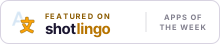
Apps of the Week badges
Two badges. Nominated is for any app sent to Apps of the Week. Featured is for apps that ran in an edition. Both are plain HTML, an image and an ordinary link, with no script, so they work in a site footer, an About page or a GitHub README.
Nominated
If you name the page that shows the badge in the submission form and our check finds it there, we review your app first and mark it Verified in the edition.


<a href="https://shotlingo.com/apps-of-the-week/?ref=badge" target="_blank" rel="noopener">
  <picture>
    <source srcset="https://shotlingo.com/badges/nominated-on-shotlingo-light.svg" media="(prefers-color-scheme: light)" />
    <img src="https://shotlingo.com/badges/nominated-on-shotlingo.svg"
         alt="Nominated for Shotlingo Apps of the Week"
         width="220" height="44" />
  </picture>
</a>The badge follows the reader's light or dark setting. It links to shotlingo.com/apps-of-the-week/, which is what our check looks for. We check the page again every Tuesday, so keep it up while you wait.
Send your app to Apps of the WeekFeatured
Only for apps that ran in an edition. Its embed links to the app's own feature page, so it is on that page, ready to copy. If you already show the Nominated badge, keep it or swap it, both count.