
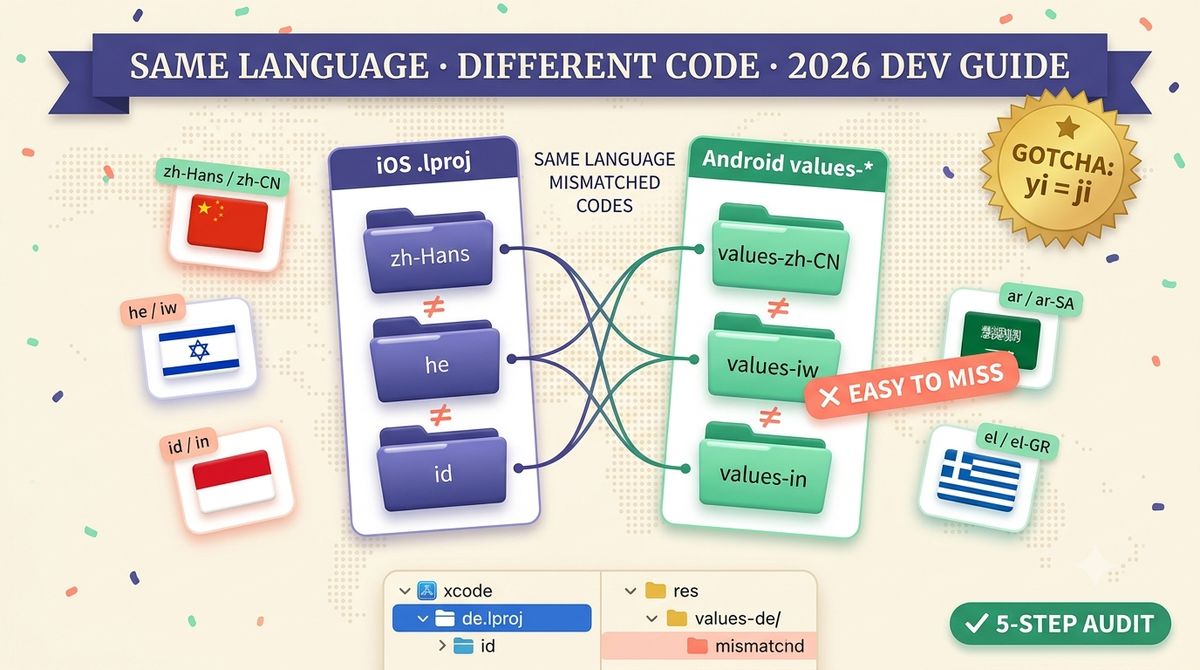
iOS .lproj vs Android values-* Locale Codes: Why They Never Match
TL;DR: iOS .lproj folders and Android values-* resource directories almost never use the same locale code for the same language. Apple's ecosystem (App Store Connect + Xcode) is built on BCP-47: zh-Hans, he, id, nb. Android inherited Java's pre-2001 locale codes for a handful of languages and never fully migrated: zh-rCN, iw, in. Neither Xcode nor Android Studio errors on a wrong folder name; the app just quietly falls back to its default language for that locale. This guide maps every mismatch that actually matters, explains why they exist, and gives you a 5-step audit to catch them before a release ships silently untranslated.
Why iOS and Android disagree on locale codes
Short answer: the two platforms adopted locale standards a decade apart, and Android never backfilled the handful of languages where the old codes had already shipped to millions of devices.
Apple's localization system was built around BCP-47 (RFC 5646), the modern IETF standard that layers language, script, and region subtags: zh-Hans for Simplified Chinese, zh-Hant for Traditional. App Store Connect and every .lproj folder in an Xcode project follow this convention consistently, and Apple has kept NSLocale aligned with the Unicode CLDR (Common Locale Data Repository) as it's evolved, so a modern Xcode project rarely fights its own tooling on locale naming.
Android's resource system, by contrast, is built on Java's java.util.Locale, which predates BCP-47 by years and borrowed ISO 639-1 codes as they existed at the time, including a few that ISO later revised. Hebrew's code changed from iw to he in 1989; Indonesian's changed from in to id around the same era; Yiddish went from ji to yi in the same standardization pass. Google updated the display strings and the Play Console listing metadata to the modern codes, but changing the actual Android resource-folder convention would have broken every app already shipping a values-iw/ or values-in/ folder, so the legacy codes stayed frozen into the values-* directory naming scheme permanently, even decades later. Norwegian is a different kind of split: iOS names the folder after the specific written standard (nb.lproj for Bokmål), while App Store Connect displays the umbrella language "Norwegian" under code no, a script/standard distinction rather than a legacy-code one.
There's also a purely mechanical difference layered on top of the legacy-code issue: how each platform writes a region subtag. iOS glues the region directly onto the language code with a hyphen and no folder-name prefix: pt-BR.lproj, es-MX.lproj, fr-CA.lproj. Android's resource-folder syntax always inserts a lowercase r before the uppercase region code: values-pt-rBR/, values-es-rMX/, values-fr-rCA/. Miss the -r and Android silently treats the folder as an unrecognized qualifier, the same silent-failure pattern as the legacy language codes, just for a different reason (a resource qualifier parsing rule instead of a locale-standard revision).
None of this is documented in one place inside either platform's own docs. Apple's localization guide covers BCP-47 for iOS in isolation, and Android's resource-qualifier docs cover values-* naming in isolation, but neither cross-references the other's convention. That gap between two internally-consistent-but-mutually-incompatible systems is exactly why the mismatch keeps costing developers real debugging hours release after release, and why it's worth a five-minute audit instead of a support-ticket discovery.
The locale code mapping table
The columns that matter when you're naming resource folders by hand: the language, the iOS .lproj folder name, and the Android values-* folder name. Where the two agree, there's nothing to remember. The interesting rows are where they don't.
| Language | iOS .lproj folder |
Android values-* folder |
|---|---|---|
| Simplified Chinese | zh-Hans.lproj | values-zh-rCN/ |
| Traditional Chinese (Taiwan) | zh-Hant.lproj | values-zh-rTW/ |
| Traditional Chinese (Hong Kong) | zh-HK.lproj | values-zh-rHK/ |
| Hebrew | he.lproj | values-iw/ |
| Indonesian | id.lproj | values-in/ |
| Norwegian (Bokmål) | nb.lproj | values-nb/ |
| Yiddish | yi.lproj | values-ji/ |
| Portuguese (Brazil) | pt-BR.lproj | values-pt-rBR/ |
| English (UK) | en-GB.lproj | values-en-rGB/ |
| Spanish (Mexico) | es-MX.lproj | values-es-rMX/ |
| French (Canada) | fr-CA.lproj | values-fr-rCA/ |
| Arabic | ar.lproj | values-ar/ |
| Japanese | ja.lproj | values-ja/ |
| German | de.lproj | values-de/ |
The last four rows agree because most languages don't have a legacy-code problem. The region-tag suffix format (-r + uppercase region on Android, no -r on iOS) is the only structural difference, and it's mechanical, not a gotcha. The rows worth memorizing are Chinese, Hebrew, Indonesian, Norwegian, and Yiddish. For the complete searchable set including App Store Connect and Google Play Console codes side by side, see the App Store locale code lookup tool.
The gotcha almost nobody documents: Yiddish
Short answer: iOS uses yi for Yiddish; Android's values-* folder needs the legacy code ji, exactly the same historical pattern as Hebrew's iw and Indonesian's in. Almost no localization reference lists it, because Yiddish support is rare enough that most teams never hit it.
ISO 639-1 revised Yiddish's code from ji to yi in the same standardization pass that changed Hebrew and Indonesian. Android inherited the same Java locale table, so the same freeze applied: values-ji/ is the folder Android actually resolves, while values-yi/ silently does nothing. If your app supports Yiddish and you only test on iOS, this is the kind of bug that ships to the Play Store, passes every iOS QA pass, and only surfaces when a Yiddish-speaking user reports the app is "in English."
A 5-step audit for locale folder mismatches
Run this before every release that touches localization, or as a one-time audit if you've never checked:
- List your actual resource folders. Run
ls */.lprojin your Xcode project andls res/values-*in your Android project. Write down every code you find on each side. - Cross-reference against the five known gotchas. Check specifically for
values-he(should bevalues-iw),values-id(should bevalues-in),values-yi(should bevalues-ji), and any Chinese folder using a script tag instead of-rCN/-rTW/-rHKregion tags on Android. - Confirm each folder actually contains strings, not an empty stub. A correctly-named empty folder is just as broken as a wrong name. It passes the audit but still shows the fallback language.
- Install the app with the device system language set to each flagged locale. Folder names can be correct and the fallback logic still wrong (missing string keys inside a correctly-named file). Only an on-device check catches both failure modes at once.
- Automate it. A five-line CI script that diffs your source-of-truth locale list against both platforms' actual folder names catches regressions the moment a new locale is added, instead of after a support ticket.
The source-of-truth list in step 5 is worth keeping as one flat array your build script can read for both platforms. Something as simple as [{ lang: "Hebrew", ios: "he", android: "iw" }, { lang: "Indonesian", ios: "id", android: "in" }, { lang: "Yiddish", ios: "yi", android: "ji" }] beats trusting either team member's memory of which five languages are exceptions. New engineers onboarding onto a localized codebase almost never know about the legacy Android codes until they've shipped the bug once; a checked-in mapping file turns institutional knowledge into something a linter can enforce.
What happens when you get it wrong
Short answer: nothing visible to you, and everything visible to the user in that locale.
Neither Xcode nor Android Studio treats an unrecognized locale folder as an error. The build succeeds, the app ships, and the App Store or Play Store listing itself may even be correctly translated (since store metadata and in-app resource folders are configured completely separately), so reviewers and even the developer testing in their own language never see the gap. The only place it surfaces is a device set to the mismatched locale, silently rendering default-language strings instead of the translation that was written, reviewed, and shipped. This is the same class of silent failure covered in why RTL layouts break just as invisibly when mirroring is skipped. The build looks fine right up until a real user in that market opens the app.
The fix is cheap once you know to look: none of these five mismatches require re-translating anything, only renaming a folder. But finding them without a checklist means waiting for a support ticket from exactly the market you were trying to grow. Screenshot copy has the same trap in reverse. A caption that's technically translated correctly can still fail if it was translated without visual context, which is a big part of why direct translation fails for Japanese App Store screenshots specifically.
A concrete version of this: an indie team ships Hebrew support, tests it on an iOS device (where he.lproj resolves correctly), sees the Hebrew strings render fine, and ships the same build config to Android without a second device check, because the iOS pass "already confirmed the translations work." Two weeks later a Play Store review says the app is "not translated at all," despite the Hebrew strings sitting right there in the APK under values-he/, a folder Android will never read. The translation was correct. The QA pass was real. The only bug was a three-letter folder name, and it cost a public 1-star review before anyone caught it.
Frequently Asked Questions
What is the difference between zh-Hans and zh-CN for app localization?
They mean the same language, Simplified Chinese, but come from different code systems. zh-Hans is a BCP-47 script subtag (Apple's App Store Connect and iOS .lproj folders use it). zh-CN is a region-based code (Google Play Console and Android values-zh-rCN/ folders use it). Uploading the wrong one to the wrong platform doesn't throw an error; it just silently fails to match, and users see your English fallback.
Is iw the same as he for Android locale folders?
Yes. "he" is the modern ISO 639-1 code for Hebrew and is what iOS, App Store Connect, and virtually every modern spec use. Android's resource system still expects the legacy Java code "iw" for the values folder (values-iw/), a holdover from Java's pre-2001 locale implementation. A values-he/ folder on Android is silently ignored. The app falls back to default strings with no build error.
Why does Android use values-in instead of values-id for Indonesian?
Same root cause as Hebrew: Android inherited Java's legacy locale codes, and Java used "in" for Indonesian before ISO 639-1 standardized on "id". iOS, App Store Connect, and Google Play's own listing metadata all use "id". Only the Android values-*/ resource folder name needs the legacy "in".
Does a mismatched locale folder cause a build error?
No, and that's what makes it dangerous. Both Xcode and Android Studio treat an unrecognized locale folder as simply unused. No warning, no failed build. The app compiles clean, ships to the store, and only shows the bug in production: users in that locale silently see your default-language strings instead of their translation.
Do localization platforms like Lokalise or Phrase handle this automatically?
Partially. Translation management platforms handle the string content and can export files pre-named for either platform's convention, but they only know to use the legacy Android codes (iw, in, ji) if you configure the locale mapping yourself. Most default to the modern ISO codes because that's what the underlying translation memory and TMS UI display. The resource-folder naming step is a project-configuration detail, not a translation-quality one, so it slips through even well-managed localization pipelines.