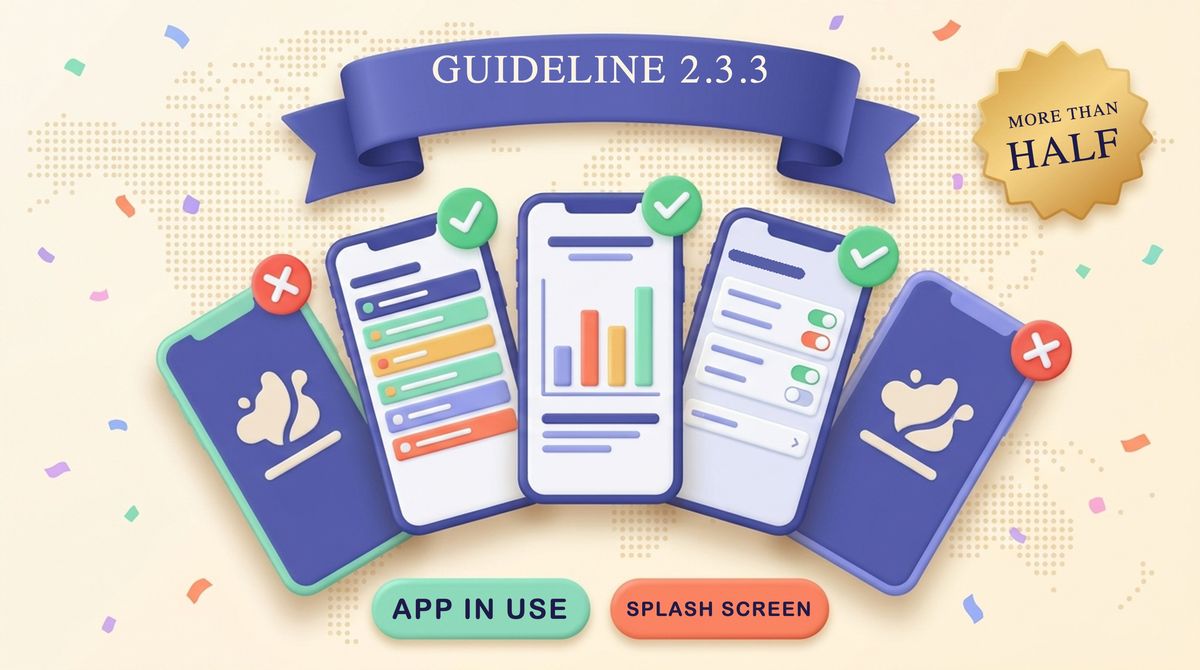
Apple's App Review Help center has a page dedicated to guideline 2.3.3, the rule that decides whether your screenshots pass review. The short version: more than half of the screenshots you submit for each device must show your app in use. Title art, a login page or a splash screen does not count. This post walks through what Apple's page says, how to count your own set, and what to check for localized sets. Every fact comes from Apple's pages, linked in the Sources section.
What does guideline 2.3.3 require for screenshots?
Guideline 2.3.3 says screenshots should show the app in use, and not merely the title art, login page or splash screen. They may include text and image overlays, for example to demonstrate input mechanisms such as an animated touch point or Apple Pencil, and they may show extended functionality on device, such as Touch Bar.
Apple's help page turns that sentence into a testable rule. App Review takes the set of screenshots submitted for each supported device into account, and approves only submissions where more than half of the screenshots show the app in use. As long as the majority shows the app in use, the rest can present the app's main benefits and features with marketing material.
How do you count the majority?
Apple gives two examples: with three screenshots for a device, two must show the app in use, and with four, three must. "More than half" is a strict test, so a tie fails. The same arithmetic for other set sizes:
| Screenshots per device | Minimum in use | Max marketing-only |
|---|---|---|
| 1 | 1 | 0 |
| 2 | 2 | 0 |
| 3 | 2 | 1 |
| 4 | 3 | 1 |
| 5 | 3 | 2 |
| 6 | 4 | 2 |
| 8 | 5 | 3 |
| 10 | 6 | 4 |
The rows for 1, 2, 5, 6, 8 and 10 are our own arithmetic from Apple's "more than half" wording. Only the 3 and 4 rows are Apple's own examples. The upper bound matters because, per Apple's screenshot specifications, you can upload up to 10 screenshots per device size.
The count is per device type, not per app. Apple's FAQ says the number of screenshots can differ by device, and that one screenshot for a device is enough as long as it shows your app in use.
What counts as "app in use"?
Apple lists Do and Don't items. The ones that change how you build a set:
| Do | Don't |
|---|---|
| Show main features in most screenshots | Submit only login pages or splash screens |
| Update screenshots with each new version | Misrepresent the actual interface |
| Show other configurations, such as Dark Mode | Use misleading marketing or promotional material |
| Add splash screens or marketing text, if most still show the app | Rely on a splash screen as one of your few shots |
The last "Don't" row is our paraphrase of the generic login and splash rule, applied to small sets. In a three-shot set, one splash screen already uses your whole marketing allowance.
Can you use overlays and captions?
Yes. Apple says screenshots can contain more than a plain capture of your interface, provided the screenshot still reflects your app in use. Use text and image overlays to demonstrate input mechanisms, and keep the primary functionality visible.
- Do use overlays to demonstrate input mechanisms.
- Do show extended functionality on device alongside your app in use.
- Do show your app running on another Apple platform when that is part of the experience.
- Don't let overlays or marketing visuals crowd out your app.
- Don't show only the hardware, or an overlay with no app interface behind it.
This is where benefit-led caption screenshots sit. A phone mockup with a headline above it and the real app screen inside reads as app in use. A full-bleed illustration with a headline and no interface does not. Our guide to feature callout annotations covers how to add arrows and labels without covering the screen.
What about localized screenshot sets?
Screenshots can be tailored to a localization, and Apple says each localization's screenshots are still assessed on whether the majority show your app in use. A set that passes in English can fail in another language if you swap in marketing-only images for that locale.
Apple's FAQ also says an image of your app in use can be spread across two or more screenshots. Panoramic layouts are allowed, so long as the app is visible in the frames that carry it.
If you localize at scale, run the same count on every language before upload. Our post on screenshot localization versus string translation explains why the images, not just the text, need a per-locale check, and the free App Store localization checker helps you spot gaps across locales.
A pre-submission check you can run in five minutes
- List the screenshots you will upload for each device size.
- Mark each one: real app UI visible and central, or marketing only.
- Count the marked ones. Is the in-use number more than half?
- Repeat for every localization, since each is assessed separately.
- Compare the UI in each screenshot with your current build. Apple tells you to update screenshots with each new version.
- Remove any overlay that hides the primary feature.
Related reading: our complete App Store screenshots guide, and the October 2026 guidelines update for the new creative assets rule, which Apple treats as a separate asset type from app-in-use screenshots. Once you are approved, the free promotion guide and the Apps of the Week hub cover where to send people.
Why this is in the news this week
Apple's November 2026 Hello Developer newsletter, published November 10, 2026, includes the item "Browse new App Review help articles" and says they explain how App Review works and give tips on preparing your app for submission. The newsletter does not say which articles are new, so we are not claiming the 2.3.3 page is one of them. It is part of that help center, and it is the one that applies to screenshots.
FAQ
Do all my screenshots have to show the app in use?
No. Apple says App Review approves only submissions where more than half of the screenshots for each supported device show the app in use. The rest can present benefits and features with marketing material.
Is a splash screen screenshot allowed?
Yes, as long as the majority of your screenshots still show the app in use. Screenshots that only show title art, a login page or a splash screen do not satisfy the guideline on their own.
Can I use one screenshot per device?
Yes. Apple's FAQ says one screenshot for a device is sufficient as long as it shows your app in use.
Do localized screenshots follow the same rule?
Yes. Each localization's screenshots are assessed on whether the majority show your app in use.
Can one app image span several screenshots?
Yes. Apple's FAQ says an image of an app in use can be displayed across multiple screenshots.
Sources
- Apple App Review Help, "2.3.3 - Show your app in use with screenshots", checked November 14, 2026
- Apple App Review Guidelines, section 2.3.3, checked November 14, 2026
- Apple App Store Connect Help, Screenshot specifications, checked November 14, 2026
- Apple Developer News, "Hello Developer: November 2026", November 10, 2026
Updated November 14, 2026. Last checked against Apple's pages on November 14, 2026. Apple may revise its guidelines, so confirm the current text before you submit.