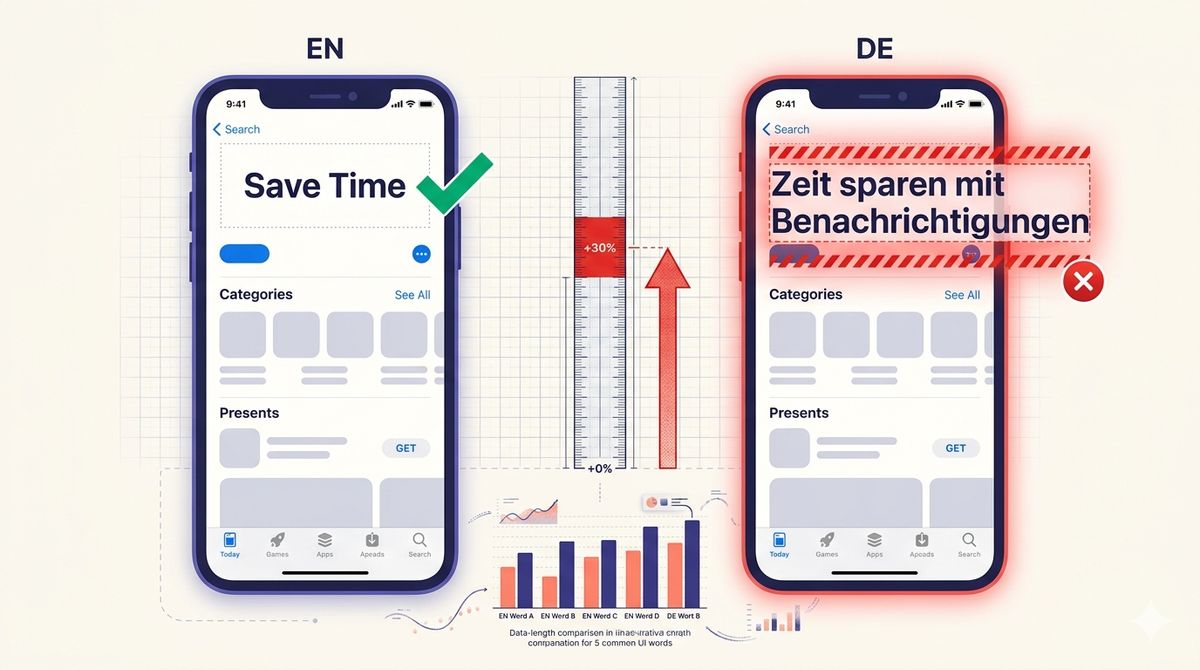
German app store screenshots need about 35% more horizontal space than the English source. Chinese needs roughly 50% less. That 85-point swing sits between two languages teams routinely treat the same way: translate the string, drop it into the existing layout, ship. Below is the full text-expansion table for all 41 languages Shotlingo supports, pulled directly from our locale dataset, so you can plan the layout before you translate instead of fixing overflow after.
The percentages come from character-count comparisons across the headline, caption and button copy used on Shotlingo's own screenshot templates: the same English source string translated into each of the 41 target languages, measured, and averaged. Short strings expand more than long ones in percentage terms, which is exactly the regime screenshot copy lives in. A 40-character marketing paragraph and a 4-word button label do not expand at the same rate, and the button label is usually the one that breaks.
Why this is a screenshot problem, not just a metadata problem
App Store and Google Play both cap metadata field lengths per locale. That is a hard character limit: a title or subtitle either fits or gets truncated at submission. We covered that failure mode separately in our character-limit overflow data. Screenshot text expansion is a different failure mode entirely. There is no hard limit that stops you at upload time. Instead, a headline that fit two lines in English wraps to three in German, a button label that fit a fixed-width pill overflows its container in Polish, and a feature callout that sat comfortably above the device mockup now collides with it. Nothing rejects the build. Users just see a screenshot that looks cramped, unfinished, or visibly translated rather than designed.
The two problems share a root cause, translated text runs a different length than the English it replaces, but they show up at different points in the pipeline and need different fixes. Metadata overflow is a submission-time validation problem. Screenshot overflow is a design-time layout problem, and it is the one that is easy to miss because your English template never warns you it exists.
The cost of missing it is quiet rather than catastrophic. Nobody files a bug report because a German button label wraps onto a second line, they just scroll past the listing without converting. Multiply that across every non-English locale you ship, and a template that only accounts for English is systematically underperforming in every market where it was never actually tested.
The full data set: text expansion for all 41 languages
Every number below is the character-length multiplier for a translated headline relative to its English source, measured across Shotlingo's locale dataset. A positive percentage means the translation runs longer. A negative percentage means it runs shorter. We split the full set into six themed tables instead of one long list, since a single 41-row table is hard to scan on a phone.
Western and Southern Europe
| Language | vs English | Design note |
|---|---|---|
| German | +35% | Longest of all 41, plan for it first |
| Portuguese (Brazil) | +30% | Distinct locale from pt-PT, do not reuse |
| Portuguese (Portugal) | +30% | Distinct locale from pt-BR, do not reuse |
| Spanish | +25% | Split es-ES and es-419 for vocabulary, same layout budget |
| French | +20% | Watch narrow non-breaking spaces before punctuation |
| Italian | +20% | Accented capitals need room in all-caps headlines |
| Dutch | +20% | Compound nouns write as one word, no hyphen to break on |
Nordic and Baltic
| Language | vs English | Design note |
|---|---|---|
| Finnish | +30% | Case suffixes stack onto root words, expect long single tokens |
| Swedish | +25% | Never split a compound to force a fit, it changes the meaning |
| Lithuanian | +25% | Case-marked endings lengthen short button labels most |
| Estonian | +25% | Same case-stacking pattern as Finnish |
| Norwegian | +20% | Localize to Bokmal, it covers effectively all readers |
| Danish | +20% | Compound nouns behave like German and Dutch |
| Latvian | +20% | Diacritics need extra line-height, not just width |
Central and Eastern Europe
| Language | vs English | Design note |
|---|---|---|
| Polish | +30% | Consonant-dense, budget the most width in this group |
| Hungarian | +30% | Agglutinative suffixes stack, same risk as Finnish |
| Czech | +25% | Nine diacritics, verify the font keeps every mark |
| Slovak | +25% | Diacritic set close to Czech, similar layout budget |
| Romanian | +20% | Cedilla and breve marks need clean rendering, not just width |
| Ukrainian | +20% | Cyrillic runs visually wider per line than Latin at the same size |
| Bulgarian | +20% | Same Cyrillic width caveat as Ukrainian |
Balkans, Greek and Catalan
| Language | vs English | Design note |
|---|---|---|
| Croatian | +25% | Latin script, but case endings add length to short labels |
| Serbian | +25% | Confirm which script, Cyrillic runs wider than Latin Serbian |
| Slovenian | +25% | Same case-marking pattern as Croatian |
| Greek | +20% | Accented capitals and a non-Latin alphabet, check font coverage |
| Catalan | +20% | Distinct from Spanish, do not reuse an es-ES layout |
Middle East, Turkic and South Asia
| Language | vs English | Design note |
|---|---|---|
| Arabic | +25% | Right-to-left, layout mirrors, not just text flips |
| Persian (Farsi) | +25% | Right-to-left, separate font stack from Arabic |
| Turkish | +20% | Suffixes stack onto the root, expect long single words |
| Urdu | +20% | Right-to-left, Nastaliq shaping needs more line-height |
| Russian | +15% | Cyrillic sets 10-15% wider than Latin at the same size |
| Hindi | +10% | Devanagari needs more line-height, not more width |
| Hebrew | 0% | Right-to-left, near parity in length, layout still mirrors |
Southeast and East Asia
| Language | vs English | Design note |
|---|---|---|
| Vietnamese | +20% | Width barely grows, but stacked tone marks need line-height |
| Indonesian | +15% | Affixes lengthen individual words more than full lines |
| Malay | +15% | Do not reuse an Indonesian layout, vocabulary diverges |
| Thai | -5% | No spaces between words, wrap by dictionary, not by character |
| Japanese | -45% | Kanji is dense, resist oversizing the font to fill the space |
| Korean | -40% | Compact by character count, roughly English visual width |
| Chinese (Simplified) | -50% | Shortest of all 41, keep font size disciplined |
| Chinese (Traditional) | -50% | More strokes per character than Simplified, test at 14-16px |
The CJK exception: languages that need less space, not more
Five of the 41 languages in the data set run shorter than English, and one sits at exact parity: Chinese Simplified and Traditional at -50%, Japanese at -45%, Korean at -40%, Thai at -5%, and Hebrew at 0%. That is a real design problem too, just the opposite one. Kanji, hanzi and hangul pack dense meaning into few characters, so a headline that filled two lines in English often fits comfortably on one line in Japanese or Korean. The trap is what teams do with the leftover space. Oversizing the font to fill a layout built for English produces headlines that look cartoonish or amateur to native readers, the opposite problem from a cramped German button but just as visible.
Thai sits in a category of its own among the contracting languages. It runs only about 5% shorter than English by character count, but it has no spaces between words, so a naive line wrap set for Latin text will break mid-word and produce unreadable output. The fix is a dictionary-based line breaker, not a width budget.
Designing for the worst case
If you design your screenshot template around English and adjust per language afterward, you will always be reacting to overflow. Every fix becomes a special case: a shrunk font here, a re-wrapped headline there, a button that got wider just for German. None of it is planned, so none of it looks intentional. The more reliable approach is to design against the worst case up front, then everything else fits with room to spare. Based on the data above, five rules cover most of the failure modes we see in localization audits.
- Budget for German, Polish, Finnish, Hungarian and Portuguese first. These five sit at +30% or higher. If your layout survives German at +35%, nearly everything else in the Latin-script set fits without further changes.
- Never center-align long-language text inside a fixed-width button. Left-align with generous padding so overflow is visible in your design tool instead of hidden until a real device renders it.
- Treat CJK as a separate design pass, not a smaller version of the same template. Font size, line count, and whitespace all need their own rules for Japanese, Korean and Chinese rather than inherited defaults from the English layout.
- Reserve extra line-height for scripts with stacked diacritics or matras. Vietnamese, Hindi and Thai all need more vertical room even when the horizontal width barely changes.
- Re-check every layout at the narrowest active screenshot width. A design that only gets tested on the largest device size hides exactly the overflow that shows up on smaller screens.
Where this data comes from
These numbers come from the same locale dataset that powers Shotlingo's per-language landing pages and screenshot generator, tested across 101 templates and the full device mockup set we support. Each language entry in the underlying data includes the expansion percentage, a visual width multiplier for CJK and RTL scripts, font recommendations, and the specific layout mistake we see most often in that language. We keep this table itself in the same dataset, so it updates if a measurement changes rather than drifting out of sync with the tool.
The German localization guide and the Japanese localization guide go deeper on those two languages specifically, including sample headlines, font notes and the exact mistake to avoid. Every other language in the table above has its own guide in the localization hub. If you want to check a specific string before you commit to a layout, the text expansion calculator estimates translated length for any input across all 41 languages.
Shotlingo applies these same expansion and width figures automatically when it generates localized screenshots, adjusting type scale, line-height and safe areas per language instead of leaving you to discover the overflow after export. That is a separate tool from this table, but it is built on the same numbers.
FAQ
What is text expansion in localization?
Text expansion is how much longer or shorter a translated string runs compared to its source language, usually expressed as a percentage. It matters for screenshot and UI design because a layout sized for the source language can overflow, or leave awkward empty space, once the string is translated.
Which languages expand the most?
Across the 41 languages Shotlingo supports, German expands the most at +35%, followed by a five-way tie at +30%: Portuguese (Brazil), Portuguese (Portugal), Polish, Finnish and Hungarian. Thirty-one of the 41 languages run at least 20% longer than English.
Which languages are shorter than English?
Five languages contract relative to English: Chinese Simplified and Traditional (-50% each), Japanese (-45%), Korean (-40%), and Thai (-5%). Hebrew sits at exact parity (0%). Chinese and Japanese are the shortest in the full set.
How much extra space should I budget for a new language?
If you have not measured the specific language yet, budget for the worst case in its family: 35% extra width for Germanic and Romance languages, 50% less for CJK scripts with a separate font-size pass, and extra line-height rather than width for RTL and Indic scripts. Check the table above for the exact figure once you know the target language.